
Managing Jobs and Customer Work More Easily
Kalac Rapport is a CRM software solution designed to help businesses manage service jobs, customer information and day-to-day work from one place. The system brings important job details, customer records, invoices and work statuses together in an organised dashboard.The CRM gives users a clear view of current jobs and their progress. Users can check recent jobs, review job statuses, manage invoices and access customer-related information without moving between different systems. The organised dashboard makes everyday tasks easier to follow and helps keep important business information in one place.
Executive Summary
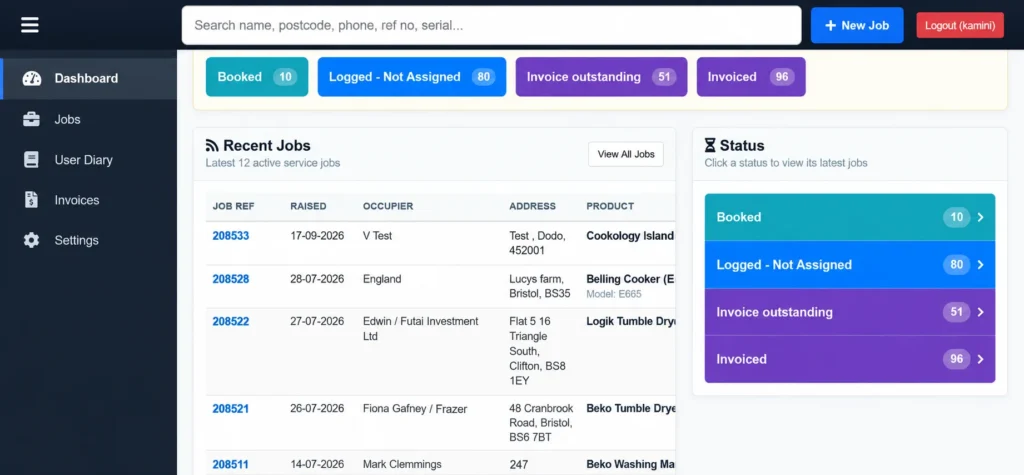
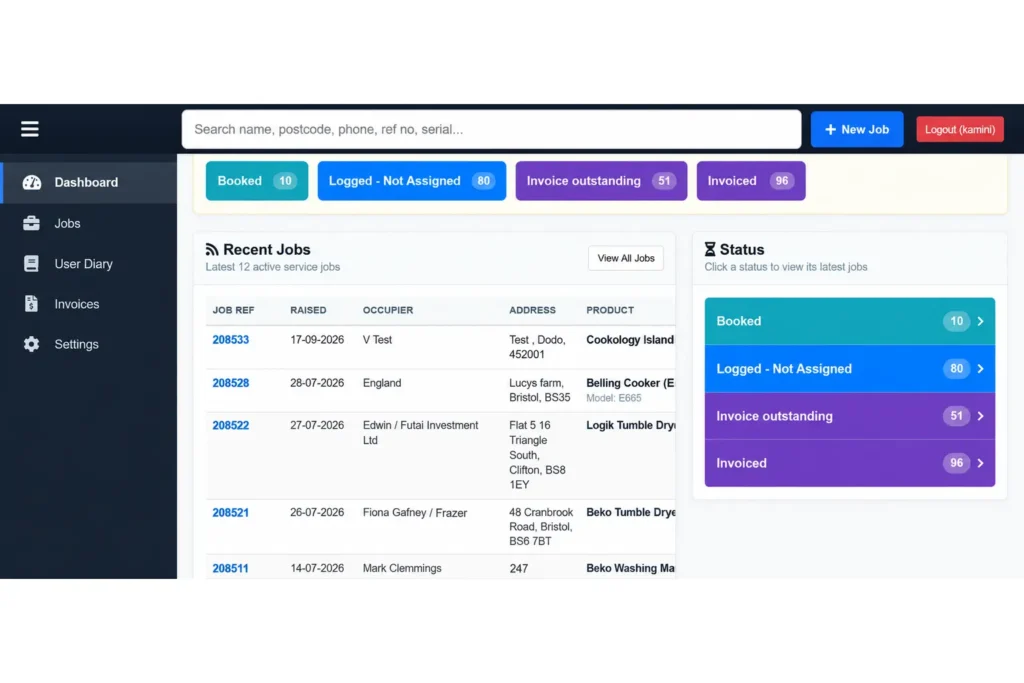
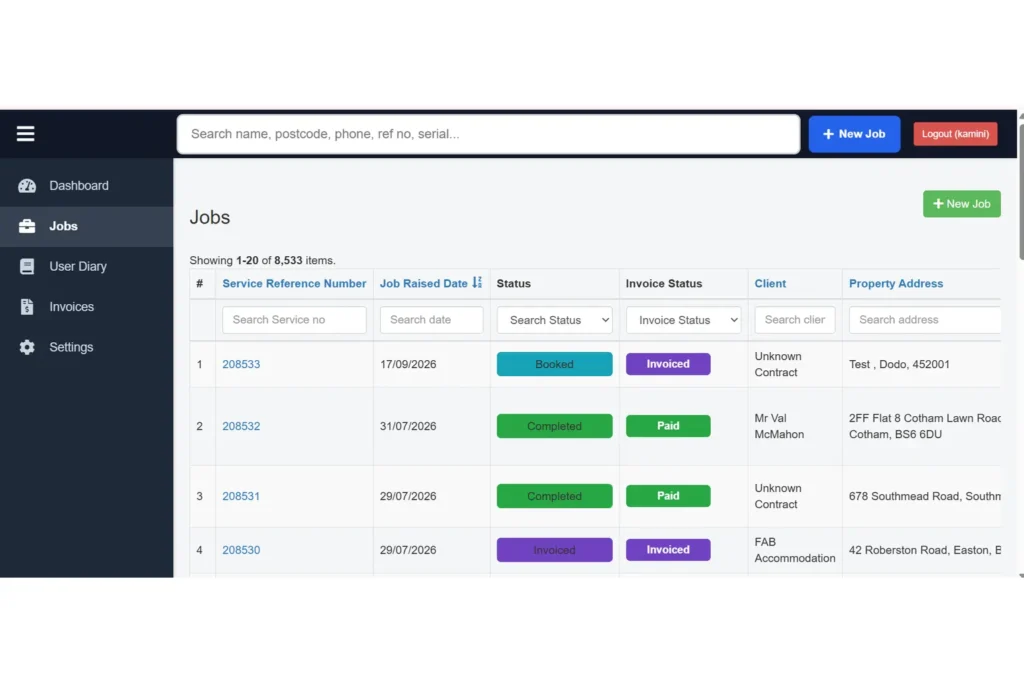
Kalac Rapport is a CRM software solution developed to help businesses manage their service and customer-related activities more efficiently. The system provides a central place for managing jobs, customer information, invoices and other important business records.The dashboard gives users a quick view of recent jobs and their current status. Different job stages such as booked, logged and not assigned, invoice outstanding and invoiced can be viewed clearly, making it easier to keep track of ongoing work.The system also provides areas for jobs, user activity and invoices, helping businesses keep their daily operations organised. The overall structure was designed to make frequently used information easier to access and manage.
Business Background
Businesses managing service jobs often deal with customer details, job information, appointments, invoices and different stages of work at the same time. Managing these details across separate systems or records can make everyday work more difficult.Kalac Rapport was created to bring these activities together in one CRM system. It provides an organised way to manage service jobs, customer information and invoicing while giving users a clearer view of ongoing work.The dashboard helps users quickly understand what work is booked, which jobs still need attention and which invoices are outstanding or completed.
Business Goals
The main goal was to create a CRM system that could make everyday job and customer management easier while keeping important business information organised.
The main goals of the system were to:
- Manage service jobs from one central system.
- Keep customer and job information organised.
- Provide a clear view of current job statuses.
- Make recent jobs easy to review.
- Help users manage invoice-related information.
- Make important CRM sections easy to access.
- Reduce the need to manage information across separate records.
- Provide a practical dashboard for daily business activities.
- Create a system that can support future business requirements.
Challenges
The main challenge was to create a CRM system that could handle different types of business information while keeping the interface simple for everyday users. Job details, customer information, invoices and work statuses needed to be connected without making the system difficult to understand.
A few areas needed particular attention during the project:
- Job management: Different service jobs needed to be organised so users could easily view and manage current work.
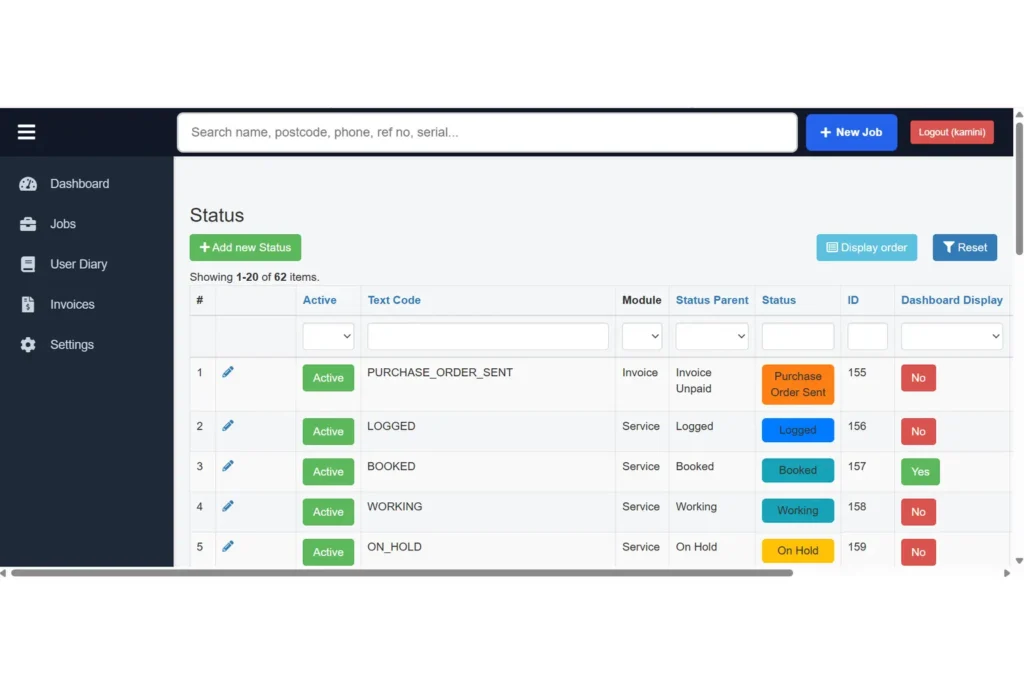
- Job status tracking: Different stages of jobs needed to be clearly visible from the dashboard.
- Customer information: Customer and job-related details needed to remain organised and easy to access.
- Invoice management: Invoice-related information needed to be presented clearly alongside the relevant business activities.
- Dashboard design: Important information needed to be visible without making the dashboard feel crowded.
- User activity: The system needed to provide a practical way to manage and review user-related activity.
- Future updates: The CRM needed a structure that could support additional features and business information over time.
Research
Before starting the development, we looked at the main activities that needed to be managed through the CRM and how users would interact with the system. The focus was on understanding how jobs, customers, invoices and work statuses could be brought together in one place.We considered the information users would need during their daily work, including recently created jobs, job status, customer details and invoice-related information. This helped us plan a dashboard that could provide useful information without requiring users to open multiple sections.
Key areas considered during the research:
- User needs: Understanding the information users need during daily work.
- Job management: Reviewing how service jobs should be organised and tracked.
- Status tracking: Considering how different job stages could be displayed clearly.
- Customer information: Planning how customer and job details could be accessed.
- Invoice management: Considering how invoice information should be organised.
- Dashboard information: Identifying the most useful information to show on the main screen.
Planning
Once the research was completed, we planned the CRM structure and how the main sections would work together. The aim was to create a practical system where users could quickly access jobs, customer information, invoices and other important records.The planning focused on creating a clear dashboard and organising the main CRM areas so users could move between different tasks without unnecessary steps.
The main areas planned during this stage included:
- CRM structure: Organising jobs, users, invoices and other important sections.
- Dashboard: Planning a central view for important business information.
- Job management: Structuring job information and status tracking.
- Navigation: Creating clear access to frequently used CRM sections.
- Information layout: Presenting important details in an organised way.
- Future updates: Keeping the system structure flexible for additional requirements.
UI/UX Strategy
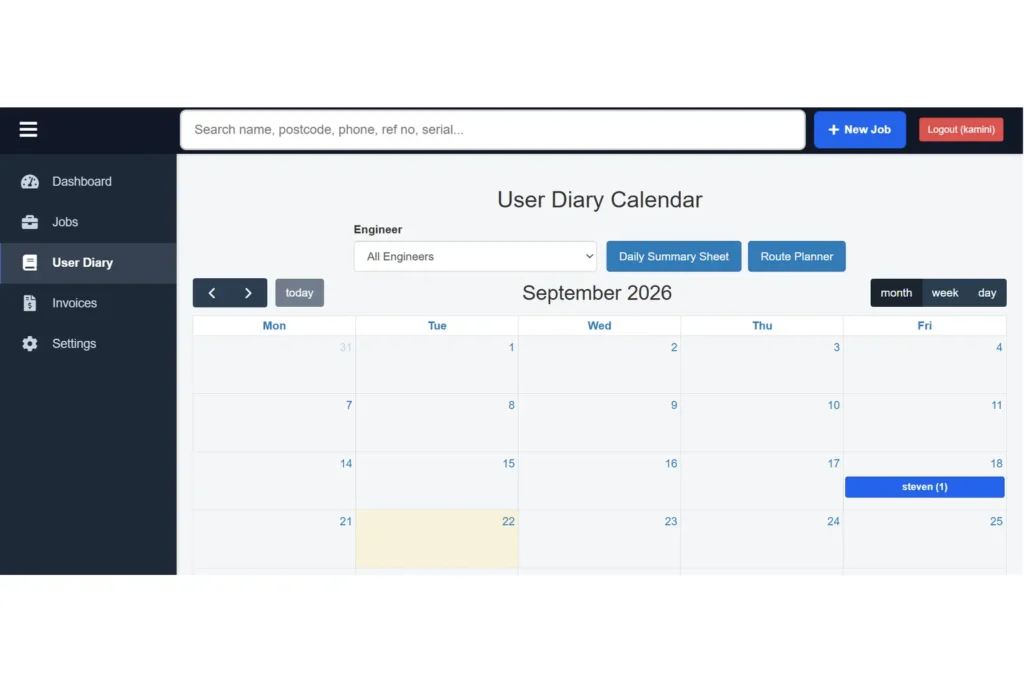
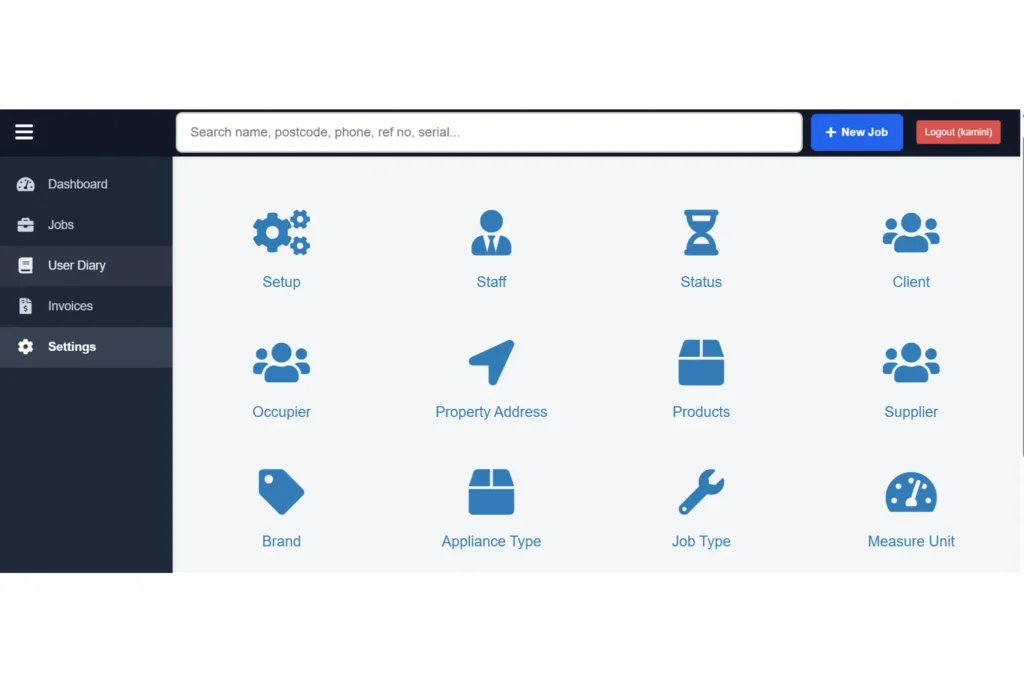
The CRM interface was designed to keep important business information clear and easy to access. The dashboard brings recent jobs and job statuses together so users can quickly understand the current state of their work.The navigation was kept straightforward, with dedicated sections for jobs, user activity, invoices and settings. Clear status areas and organised information help users move through the system without unnecessary steps.
- Clean and organised dashboard
- Clear job status information
- Easy access to recent jobs
- Simple navigation between CRM sections
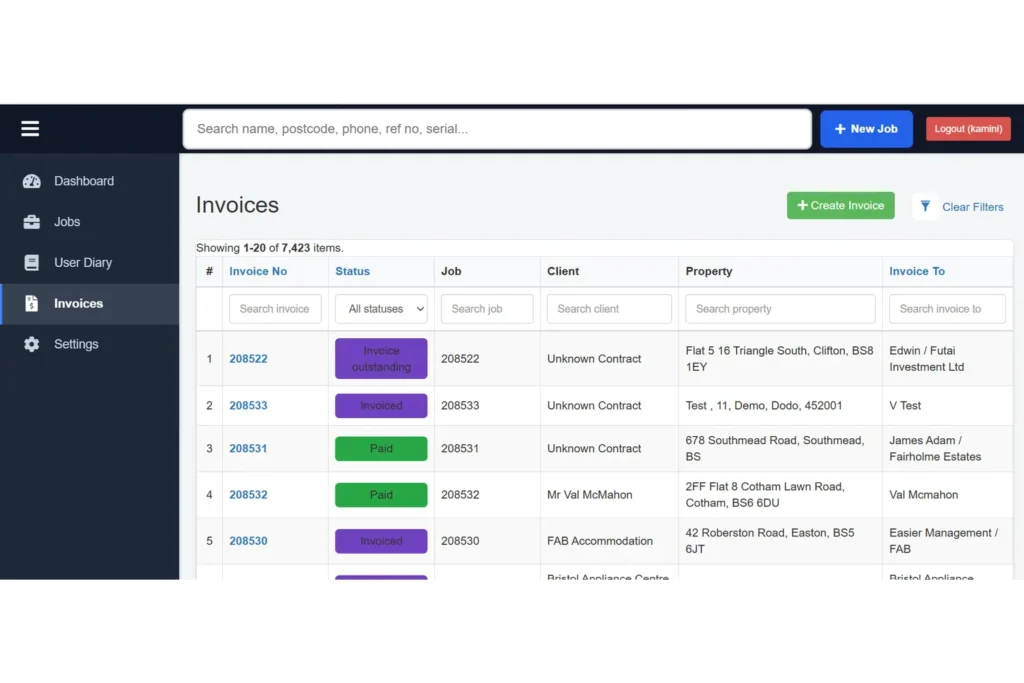
- Clearly presented invoice information
- Organised customer and job details
- Practical layout for everyday use
- Responsive and user-friendly interface
Development
The CRM was developed with a focus on making job and business management practical for everyday users. The main system areas were organised around jobs, users, invoices and business activity, with the dashboard providing a quick overview of important information.
The development also focused on connecting different CRM activities so users could manage their work from one central system.
- CRM Development – Developed the system around service and customer management requirements.
Job Management – Created organised areas for managing service jobs and job information.
Dashboard Development – Provided a central view of recent jobs and current statuses.
Status Management – Organised different stages of job progress for easier tracking.
Invoice Management – Included an organised area for invoice-related information.
User Activity – Provided a dedicated section for user-related activity.
PHP Development – Used PHP for the core application and business functionality.
Yii2 Framework – Used Yii2 to structure and manage the CRM application.
React Development – Used React for interactive and user-friendly interface components.
MySQL Database – Used MySQL to manage and organise CRM data and business records.
Responsive Design – Adapted the interface for different screen sizes.
Content Management – Structured business information for easier management and updates.
Architecture
The CRM was organised around the main activities users need to manage during their daily work. Jobs, customer information, user activity and invoices were arranged into connected sections, while the dashboard provides a central view of important business information. The structure also provides room for adding new features and business requirements as the system develops.
SEO Strategy
The CRM website was structured with clear page content and organised sections to make important information easier to understand. Relevant headings, page content and a simple structure were used to provide a clear foundation for search visibility.The website structure also keeps the main content organised, making it easier to manage and update information when required. Clear page organisation helps users and search engines understand the purpose of different sections more easily.
Performance Optimization
The CRM was developed with a focus on keeping the dashboard and internal pages responsive and comfortable to use. Information was arranged into clear sections so users could review jobs, statuses and invoice-related details without unnecessary navigation.The dashboard was kept organised to make important information easier to access, while individual CRM sections were structured around specific tasks. This approach helps maintain a smooth working experience as more jobs and business information are added to the system.
Security
The CRM was designed as an account-based system where users need to log in to access the application. The public-facing link currently leads to a login page, with username and password fields provided for account access.The system structure keeps CRM information within the application area, allowing authorised users to work with jobs, invoices and other business information through the appropriate sections.
Scalability
The CRM was structured to support additional jobs, customer information, invoices and business records as the organisation grows. Its organised sections make it possible to expand the amount of information managed through the system without changing the overall approach to daily work.The structure also provides room for adding new features and sections as business requirements change, allowing the CRM to develop alongside the needs of the organisation.
Business Impact
Kalac Rapport provides a central system for managing service jobs, customer-related information and invoice activities. The dashboard gives users a clearer view of current work, while organised job statuses make it easier to understand which jobs require attention.By bringing important business activities into one CRM system, the solution provides a more organised way to manage daily work and keep job and invoice information accessible to users.
Project Gallery
Screenshots and deliverables from the project.
Frequently Asked Questions
What type of software did Prime Core IT Services develop for Kalac Rapport?
Prime Core IT Services developed a CRM software solution for managing service jobs, customer-related information, invoices and business activities.
What was the main purpose of Kalac Rapport?
The main purpose was to bring important job and business information into one organised system and make everyday work easier to manage.
What information can be managed through the CRM?
The system is structured around areas such as jobs, user activity, invoices, job statuses and related business information.
Does the CRM provide a dashboard?
Yes. The dashboard provides an overview of recent jobs and different job statuses, helping users quickly review current work.
What job statuses are shown on the dashboard?
The dashboard shown in the project interface includes statuses such as Booked, Logged – Not Assigned, Invoice Outstanding and Invoiced.
Does the system include invoice management?
Yes. Invoice-related information is included as part of the CRM structure, with a dedicated invoice section.
Is Kalac Rapport a login-based system?
Yes. The application provides a login page where users can enter their account details to access the system.
Can the CRM be expanded in the future?
Yes. The organised structure provides room for adding new features, information and business requirements as the system develops.